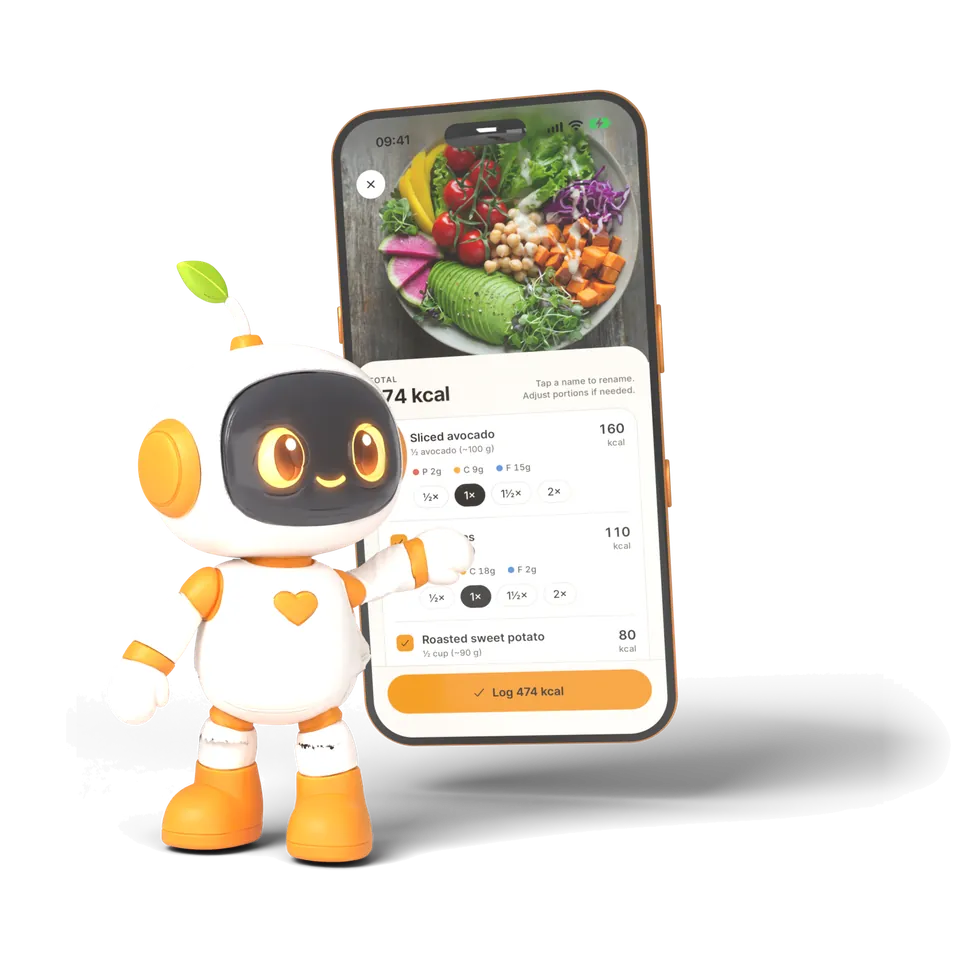
FitZen is an AI calorie counter and food tracker. Photograph your plate and it estimates calories and macros in seconds. Then RoboFit, your AI nutrition coach, suggests what to eat next — based on your log, your goals and your health notes.
FitZen is a calorie counter and nutrition app for iPhone and Android that estimates calories and macronutrients (protein, carbohydrate and fat) from a photo of a meal. It is developed by Ali Mert Güleç in Türkiye and available in 11 languages. FitZen 2.0 adds RoboFit, an AI nutrition coach that reads your food log, goals and optional health notes, and a Calendar that keeps every past day with its meals, macros, water, workouts and fasting. The app is free to download: the free version includes 3 manual food logs and 3 photo scans, and FitZen Premium (weekly or yearly) unlocks unlimited logging and photo scans, RoboFit, AI diet plans, the fasting timer, fridge recipes and the weekly report.
Free version: 3 manual food logs and 3 photo scans, plus recipes, the Calendar and the Today screen
FitZen Premium: weekly or yearly plan; the yearly plan has a 3-day free trial for eligible new users
Optional health profile with filters for diabetes, blood pressure, PCOS and allergies
This site publishes 186 recipes with calories and macros per serving, in all 11 languages
Inside FitZen 2.0
Everything you need to eat well, in one app
From a single photo to a full week of meals. Every screen below is the real app.
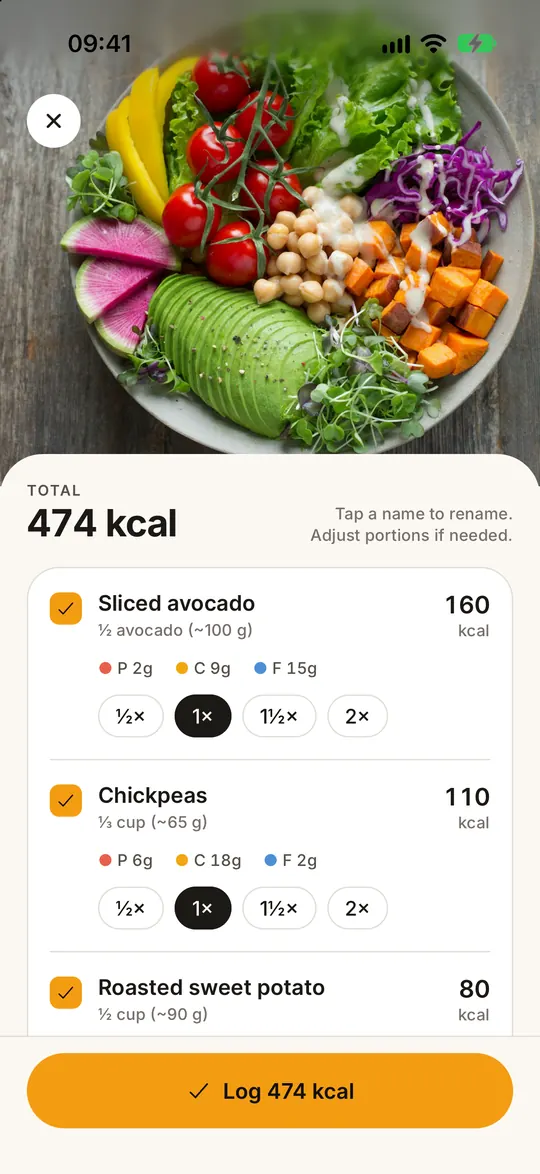
Snap a meal, know your calories
AI calorie counter: calories & macros from one photo
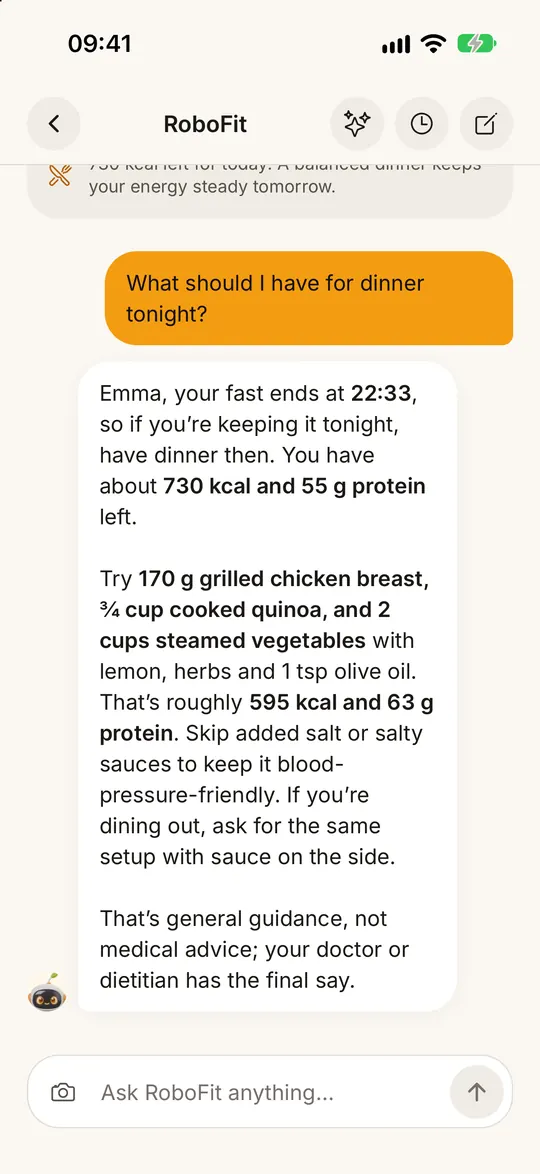
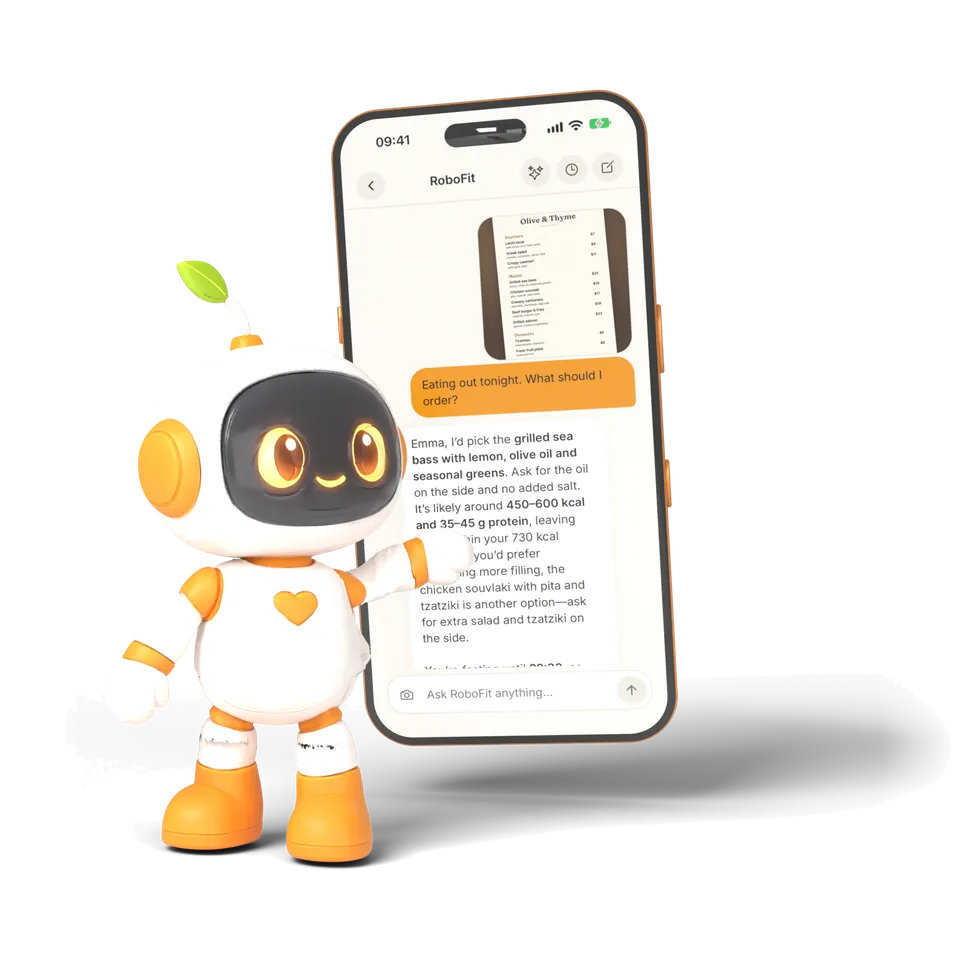
A coach that knows your plate
RoboFit sees your logs, goals & health notes, 24/7
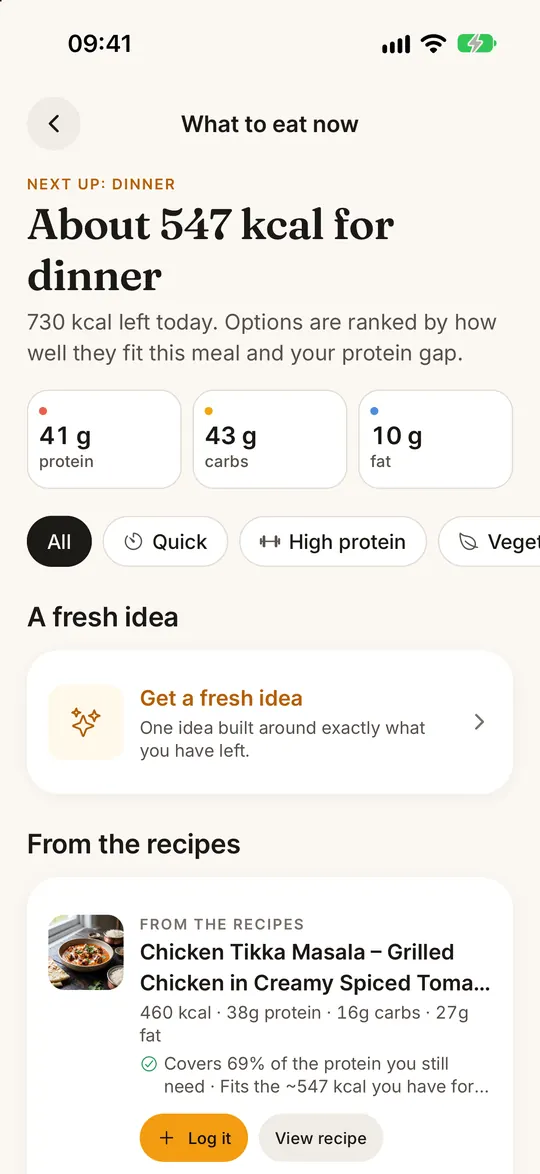
What should I eat next? Answered
Meal ideas that fit your remaining calories
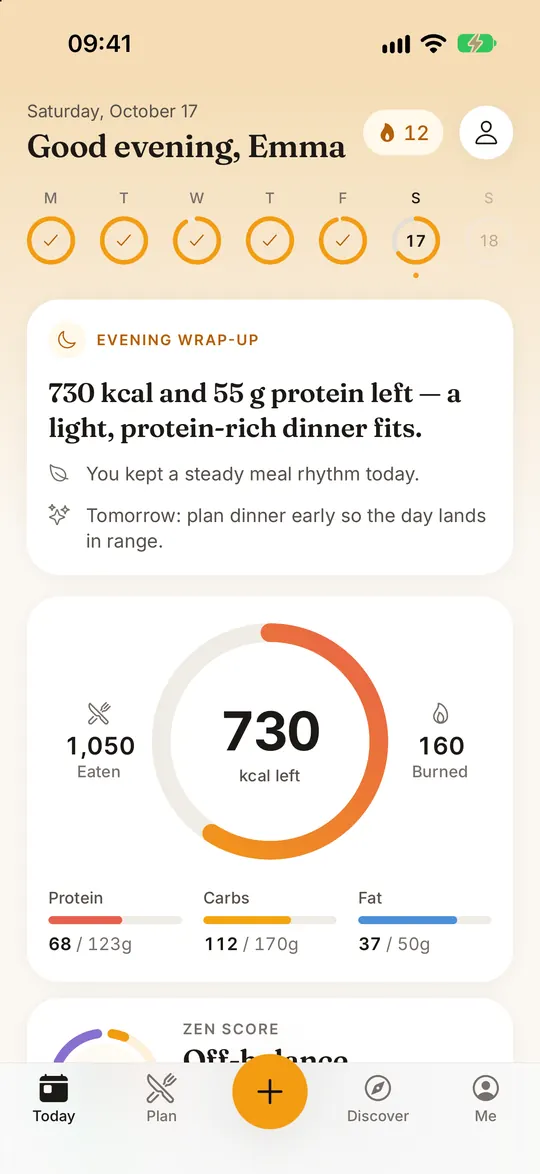
Your whole day in one ring
Calories, macros, water & your daily Zen Score
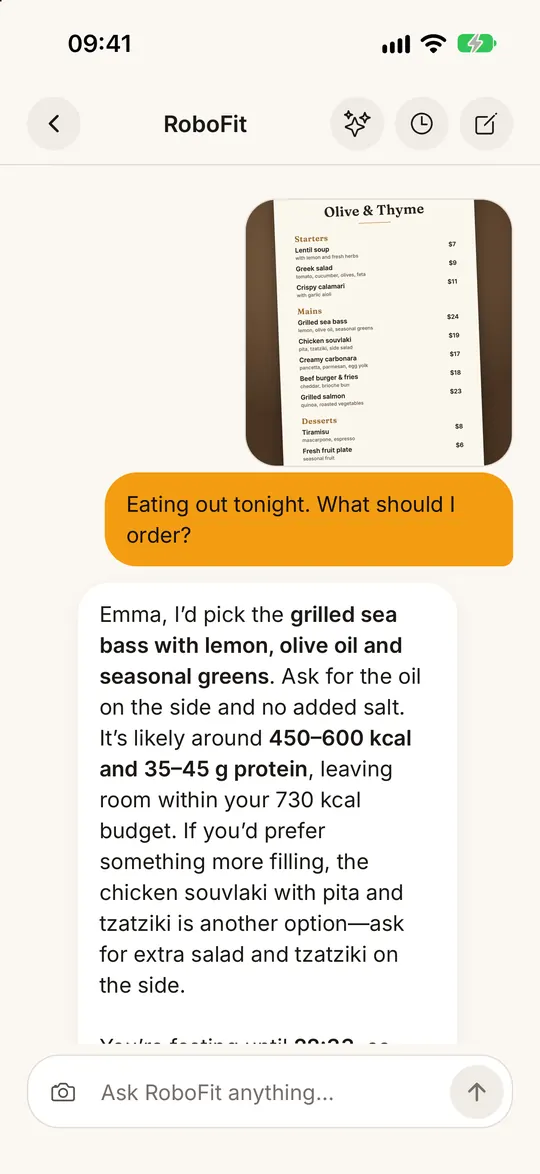
Show RoboFit any photo
Your fridge, a restaurant menu or a nutrition label
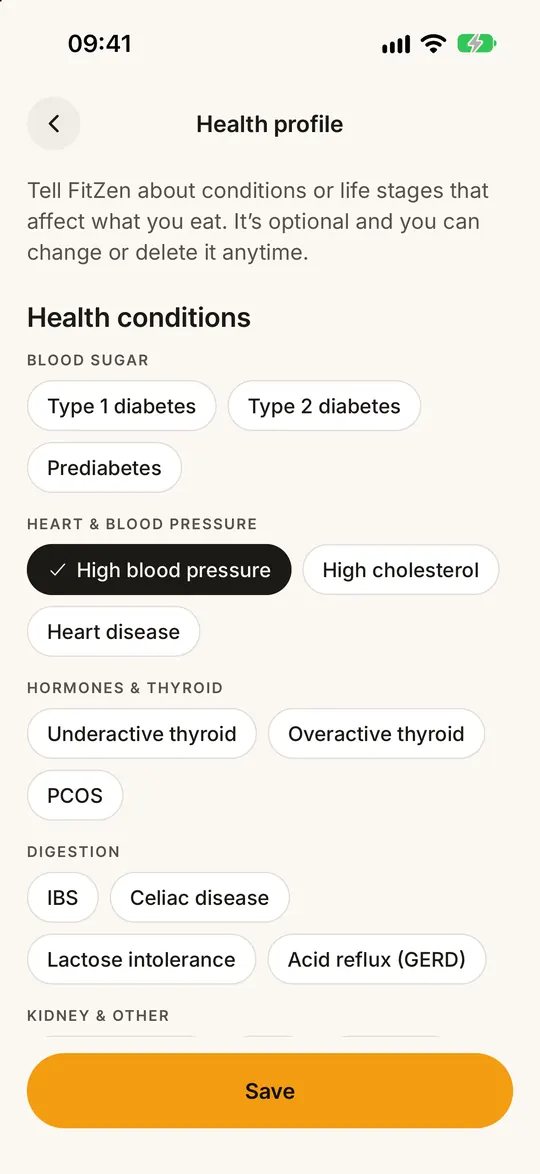
Meals that fit your health needs
Filters for diabetes, blood pressure, PCOS & allergies
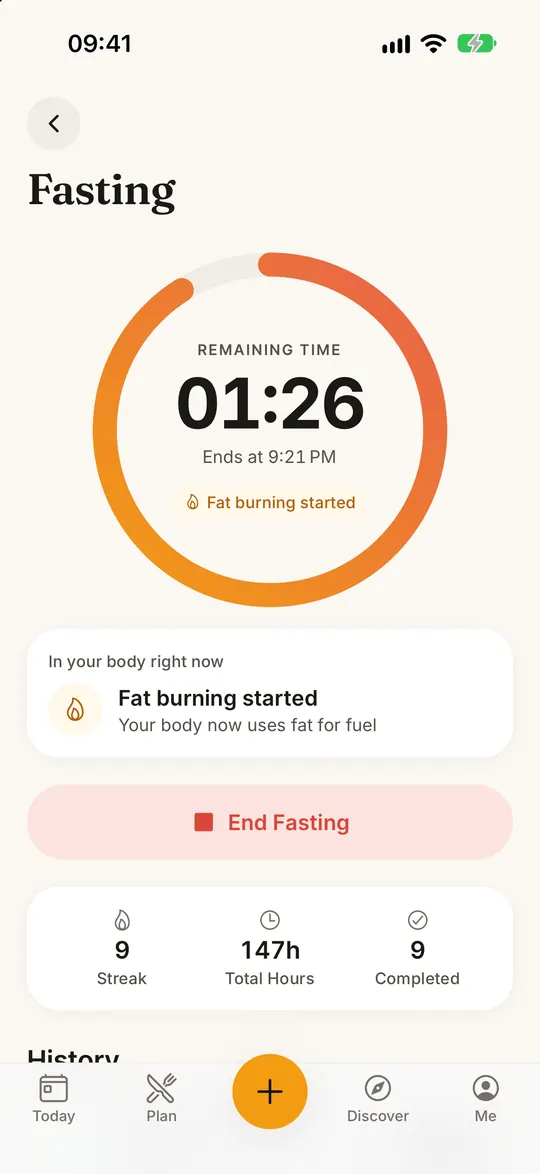
Intermittent fasting, made simple
16:8, 18:6, 20:4 & OMAD timers with streaks
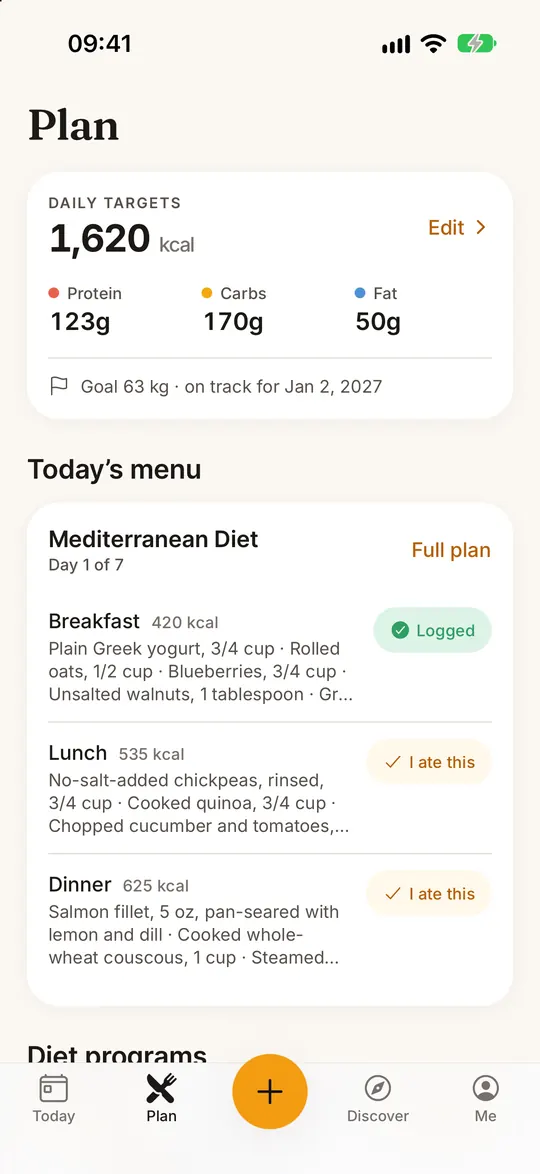
10 diet plans, day by day
Mediterranean, keto, low-carb, DASH, paleo & more, with an AI 7-day plan
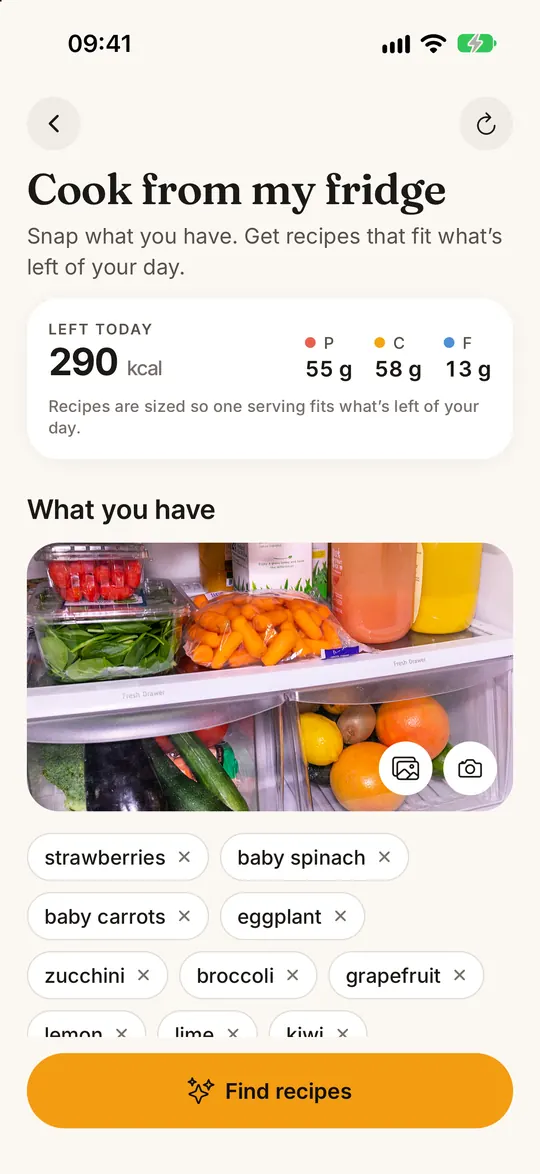
Your fridge → healthy recipes
Step-by-step cooking + a vegan version of any recipe
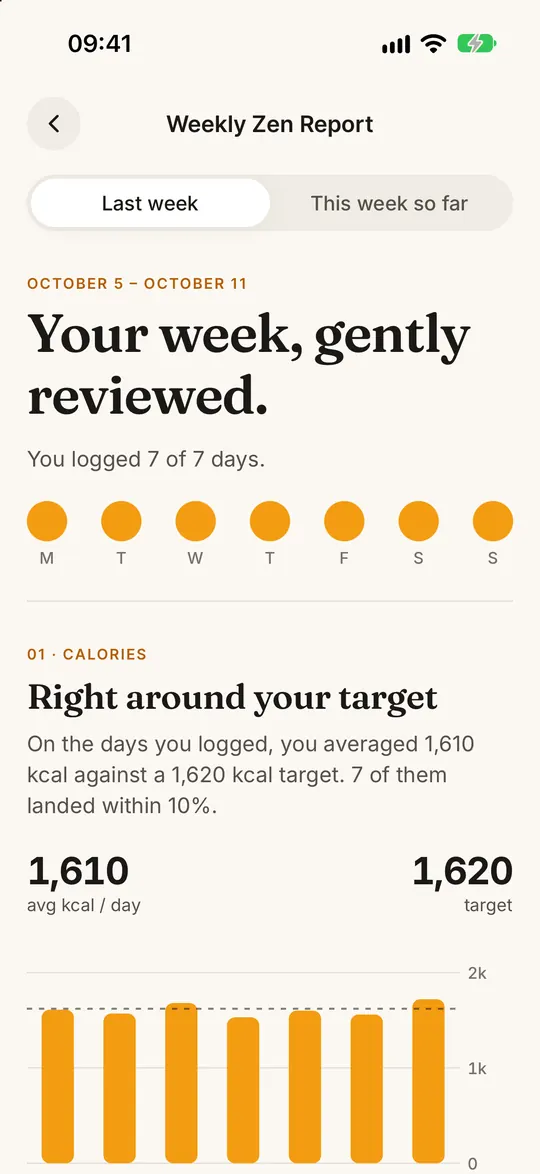
Your week, explained by AI
Weekly Zen report, trends, streaks & badges
Also includedCalendarWater trackingShopping listAchievements and badgesCommunitySteps from Apple Health (iPhone)
FitZen features at a glance
Photo calorie counter
Estimates the calories and macros of a meal from one photo; you can edit every portion before saving.
RoboFit
The AI nutrition coach inside FitZen. It knows your log, goals and the health notes you choose to share, and accepts photos of your fridge, a menu or a nutrition label.
“What to eat now”
Meal suggestions ranked by how well they fit your remaining calories and protein for the day.
Zen Score
A daily score from 0 to 100 that rewards a balanced day rather than restriction.
Calendar
Day, week and month views of everything you logged: meals with times and portions, macros, water, workouts and fasting.
Health profile
Optional conditions and allergies — such as diabetes, high blood pressure or PCOS — that suggestions and recipes take into account.
Fasting timer
Intermittent fasting timers for 16:8, 18:6, 20:4 and OMAD, with streaks.
Diet plans
10 eating plans including Mediterranean, keto, low-carb, DASH and paleo, each with an AI-built 7-day plan.
Fridge recipes
Turns the ingredients you have into step-by-step recipes, each with a vegan version.
Weekly report
An AI summary of your week: calorie and macro trends, streaks and what to focus on next.
Water, shopping list, achievements, community
Daily water tracking, a shopping list built from your recipes, badges for streaks and a community feed for sharing meals and tips.
Meet RoboFit
An AI coach that knows your plate
RoboFit is the AI nutrition coach built into FitZen. It sees what you have logged today, your calorie and macro targets and the health notes you choose to share, and it can look back at past days in your Calendar — so its answers are about your day, not a generic diet.
“What should I eat next?”
Get meal ideas ranked by how well they fit your remaining calories and protein.
Show it any photo
Snap your fridge, a restaurant menu or a nutrition label and ask what fits your goal.
Built around your health
Suggestions respect the conditions and allergies in your health profile, such as diabetes, high blood pressure or PCOS.
Around the clock
Ask at any hour: swaps, portion sizes, eating out or what to put on your shopping list.
RoboFit gives general nutrition guidance, not medical advice. If you have a medical condition, follow your doctor’s advice.
New: Calendar
Every day you logged, one tap away
The Calendar keeps your whole history in day, week and month views. Tap any day to see every meal with its time and portion, your macros, water, workouts and fasting — exactly as you logged them.
Day, week and month
Spot patterns at a glance: days on target, days over, logged streaks and your daily average.
The full picture of a day
Meals with times and portions, macros, water, exercise and fasting windows in one place.
RoboFit remembers
RoboFit can read past days, so you can ask about any date in your history.
Logging food is the step most people give up on. FitZen turns it into one photo and a quick check.
1
Photograph your plate
Open the camera in FitZen and take a photo of the meal. Mixed plates are fine: each food is detected separately.
2
AI identifies foods and portions
An image model recognises each item and estimates its portion; calories, protein, carbs and fat are then calculated from nutrition data.
3
Check and edit the estimate
The result is an estimate, not a weighing. Change a portion, correct a food or remove an item with a tap before you save.
4
Your day updates, RoboFit suggests what’s next
The meal lands on your Today ring and in your Calendar, and RoboFit can suggest a next meal that fits what is left of your day.
How accurate is it? Photo calorie counting is an AI estimate. It works best on clearly visible, separated foods and is less precise for dishes in sauce, stacked food or closed containers — that is why every result can be edited.
One photo, the whole plate
Every item gets its own calories and macros, so you can halve the rice or skip the sauce before you log.
Why it’s different
Diets don’t fail because people give up — they fail because tracking is unbearable
In a classic calorie app, logging one meal takes minutes. Two weeks in, most people stop. FitZen gets logging down to a single photo, and RoboFit turns the numbers into a plan for your next meal — because the only plan that works is the one you actually keep.
No manual gram entry — a photo is enough
Eating out? Show RoboFit the menu and ask what fits
This app genuinely helped me lose 5 kilos in a month.
Resmen bu uygulama sayesinde 1 ayda 5 kilo vermem yardımcı oldu.
BuseG12
genuinely incredible
I have never used an app this effective, this useful to me. Every dish in the world is in there. Well done.
ben bu kadar efektif bu ksdar işime yarayan bir uygulama kullanmadım. dünyadaki bütün yemekler mevcut. ellerinize sağlık
Consendirten
so many features in one app, I loved it
I liked this app enormously. I loved calculating calories with the camera. You have brought so many features together in a single app. Well done.
asiri begendigim bir uygulama oldu kamerayla kalori hesaplamasina bayildim bir suru ozelligi tek uygulamada birlestirmissiniz elinize saglik
Nehir Han
Recipe variety
I used to get so bored of eating the same things while dieting. Finding different, easy recipes in this app made it much easier to stick with it. Whatever I feel like, something suitable always turns up.
Diyet yaparken hep aynı şeyleri yemekten çok sıkılıyordum. Bu uygulamada farklı ve kolay tarifler bulunca diyete devam etmek daha kolaylaştı. Canım ne isterse ona uygun bir şey mutlaka çıkıyor.
Uysalll1234
Definitely try the recipe generator
I photographed my fridge and it analysed the ingredients and gave me really nice recipes. Genuinely impressive.
Buzdolabını çektim ve malzemeleri analiz edip çok güzel yemek tarifleri verdi. Gerçekten çok başarılı.
şensi
everyone should use this, everyone
From intermittent fasting to the Mediterranean diet, everything is in the app. The calorie calculation from a photo was especially brilliant.
aralikli oructan akdeniz diyetine kadar her sey var uygulamada. ozellikle fotograftan kalori hesabi harikaydi
abcdefghıj893553
Source: App Store · July 26, 2026. Reviews are published verbatim and in their original language.
Weight results described in reviews are individual experiences and are not a guarantee of typical results.
FitZen is free to download. The free version includes 3 manual food logs and 3 photo scans in total, and you can browse all recipes, the Calendar and the Today screen without paying. Unlimited logging and photo scans, the RoboFit AI coach, AI diet plans, the fasting timer, fridge recipes and the weekly report are part of FitZen Premium.
How much does FitZen Premium cost, and is there a free trial?
Premium is available as a weekly or a yearly plan. The yearly plan comes with a 3-day free trial for eligible new users; if you cancel before the trial ends, you are not charged. Prices differ by country, so the current price is always shown in your currency in the App Store or Google Play before you confirm.
How do I cancel my FitZen subscription?
Subscriptions are managed by the store you bought them from. On iPhone, open Settings › your name › Subscriptions and choose FitZen. On Android, open Google Play › Profile › Payments & subscriptions › Subscriptions. Deleting the app or your FitZen account does not cancel a store subscription on its own.
How does FitZen calculate calories from a photo of a meal?
Your photo is analysed by an AI image model that separates the foods on the plate and estimates each portion. Calories, protein, carbohydrate and fat are then calculated from nutrition data. Before you save, you can adjust any portion or correct a food it misread.
How accurate is photo calorie counting?
It is an AI estimate, not a weighing. It is most reliable for foods that are clearly visible and separated, and less precise for dishes covered in sauce, stacked food or closed containers. That is why an edit screen opens after every analysis: check the portions and you have the final say.
What is RoboFit, and what can I ask it?
RoboFit is the AI nutrition coach inside FitZen (a Premium feature). It can see your food log, your calorie and macro targets and any health notes you choose to share, so you can ask “what should I have for dinner?” and get an answer that fits what is left of your day. You can also send it a photo of your fridge, a restaurant menu or a nutrition label. RoboFit gives general guidance, not medical advice.
Can I see what I ate on a past day?
Yes. The Calendar has day, week and month views. Tap any day to see every meal with its time and portion, plus macros, water, workouts and fasting. RoboFit can read past days too, so you can ask things like “what did I eat last Tuesday?”.
Can I use FitZen if I have diabetes or high blood pressure?
You can add conditions such as type 1 or type 2 diabetes, high blood pressure, high cholesterol or PCOS, along with allergies, to an optional health profile. Meal suggestions, recipes and RoboFit then take them into account. FitZen offers general nutrition guidance only: it does not replace your doctor, so talk to them about your diet, especially if you take medication.
Does FitZen support intermittent fasting?
Yes. The fasting timer (a Premium feature) covers 16:8, 18:6, 20:4 and OMAD, with streaks, and sits next to your calorie tracking. Your fasting windows also appear on each day in the Calendar.
Which diets does FitZen support?
There are 10 diet plans, including Mediterranean, keto, low-carb, DASH and paleo. With Premium, FitZen builds an AI 7-day plan for the diet you choose, and the fridge-to-recipe feature can give a vegan version of any recipe.
Is my data private? Is it used for AI?
Your data is not sold. AI features only run after you agree: when you use them, the photo or text you submit and related profile data (such as goals, weight and dietary preferences) are sent to OpenAI for processing, and OpenAI does not use this data to train its models. Health conditions are shared with RoboFit only with your separate consent, which you can withdraw at any time. You can delete your account and all your data from inside the app.
Which languages does FitZen support?
The app and this website are available in 11 languages: Turkish, English, German, French, Spanish, Italian, Arabic, Indonesian, Japanese, Thai and Malay. Every recipe on this site is published in all 11.
Does FitZen work offline, and which phones does it run on?
FitZen runs on iPhone (App Store) and Android phones (Google Play). Photo analysis, RoboFit and other AI features need an internet connection. On iPhone, steps can be synced from Apple Health; step sync is not available on Android.
Does FitZen have a barcode scanner?
No. FitZen logs food from a photo of the meal or by manual entry. For packaged food you can photograph the nutrition label and ask RoboFit about it.
Free to start
Get started
Meet RoboFit and log today’s first meal
Download it, create your account, photograph your first plate. Setup takes under a minute. Start with the free version; the yearly Premium plan includes a 3-day free trial for eligible new users.